Microgaming Keno
- Software
- Microgaming
- Score
- 8.50/ 10
Keno, as it is designed and presented by Microgaming, the world's leader in online casino software, bears a resemblance to the kind of keno game you may play in a land-based casino, with some notable exceptions; namely the fact that you don't have to wait through a time interval between playing one game and another, and also, the game is much more convenient in terms of keeping track of where you stand.
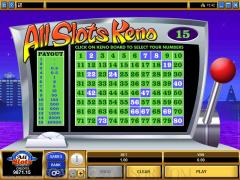
The "board" contains numbers 1 through 80. What you will do as the player is choose up to fifteen numbers on that board, with those numbers clearly marked. Then twenty virtual "balls" are chosen at random and the numbers they represent are posted on the board. You will win according to how many of these numbers you were able to match. Full Review - Microgaming Keno (8.50)
Changing the size of your bet is very easy. In the left-center at the bottom of the game interface, you can choose the chip size. It goes from 1 to 10, and you will use the (-) button to decrease it or the (+) button to increase it.
As you are choosing your numbers before the keno balls start to come out, your potential payouts are displayed very clearly on a table that is just to the left of the board. So as you choose each succeeding number these are registered. The payouts change according to how many numbers you select. You can see all of this developing on the left-hand payout table as you are making your selections.
Following the color coding is easy. The squares on the board are green. When you make a selection, those squares turn blue. When the balls come out, the squares for the numbers they represent turn grey. And when you get a match, the numbers will be in yellow with a red background. If at any time before you click on the "Play" button, you want to un-select a number, just click it again and watch for it to turn back to green.
You have the ability to turn on or off the background sounds or do the same to all sounds associated with the game if you so wish.
The "board" contains numbers 1 through 80. What you will do as the player is choose up to fifteen numbers on that board, with those numbers clearly marked. Then twenty virtual "balls" are chosen at random and the numbers they represent are posted on the board. You will win according to how many of these numbers you were able to match. Full Review - Microgaming Keno (8.50)
Changing the size of your bet is very easy. In the left-center at the bottom of the game interface, you can choose the chip size. It goes from 1 to 10, and you will use the (-) button to decrease it or the (+) button to increase it.
As you are choosing your numbers before the keno balls start to come out, your potential payouts are displayed very clearly on a table that is just to the left of the board. So as you choose each succeeding number these are registered. The payouts change according to how many numbers you select. You can see all of this developing on the left-hand payout table as you are making your selections.
Following the color coding is easy. The squares on the board are green. When you make a selection, those squares turn blue. When the balls come out, the squares for the numbers they represent turn grey. And when you get a match, the numbers will be in yellow with a red background. If at any time before you click on the "Play" button, you want to un-select a number, just click it again and watch for it to turn back to green.
You have the ability to turn on or off the background sounds or do the same to all sounds associated with the game if you so wish.